


About the Prompt
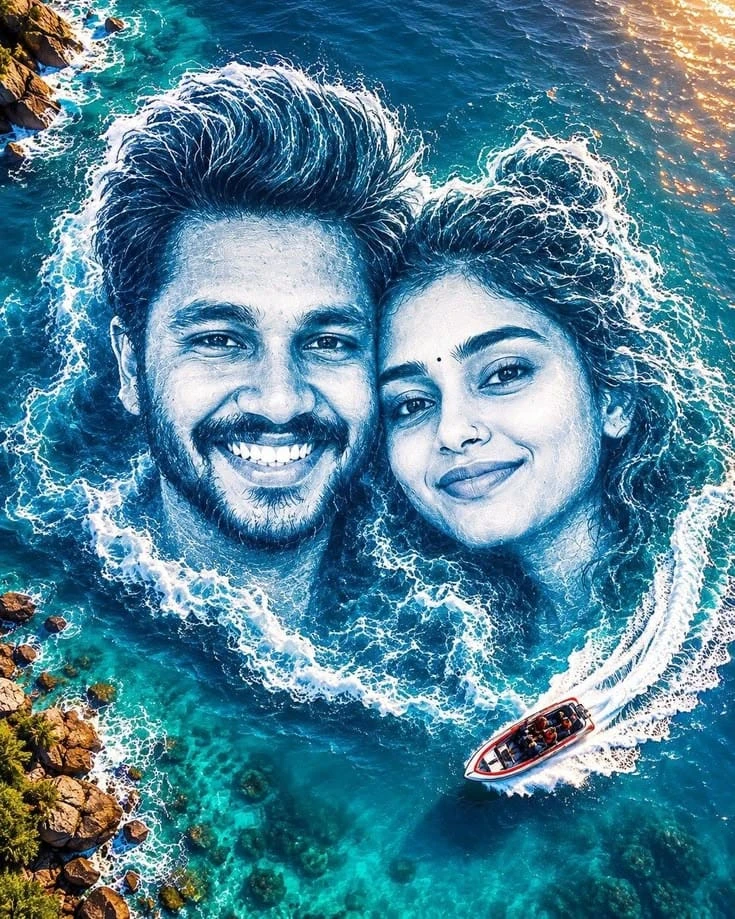
Couple trending ai photo prompt is a creative double portrait, where a smiling man with a beard and a calm, soft eyed woman with a small bindi appear to rise out of the sea itself. The ocean foam forms their hair, shoulders and the circular wave pattern around them, so the faces blend naturally into the water. The man’s wide smile and the woman’s gentle expression give the scene a warm, romantic feel.
The setting adds to the drama crystal clear turquoise water, visible coral and sea floor textures, a rocky coastline on the edges, and golden sunlight sparkling on the surface. A tiny speedboat with a long white wake adds scale and movement to the composition.
How to Use (For Image Generation)
- Open an AI image generator that supports reference photo upload.
- Upload one clear photo with both faces visible (front-facing, good lighting, no heavy filters).
- Paste the full prompt from the Prompt Text section below.
- Set the aspect ratio to 4:5 vertical and the quality to the highest option.
- Generate 2 to 4 images and compare both faces with your original photo.
- If a face drifts, re-run and add “keep both faces exactly the same as the reference” at the start.
Prompt Information & Details
- Type: Creative couple portrait, aerial ocean art (reference-image based)
- Subjects: One man and one woman, identities preserved
- Expressions: Man smiling naturally, woman soft and calm
- Concept: Faces surrounded by white ocean foam in a circular wave pattern
- Water: Crystal-clear turquoise with deep-blue tones and sunlight reflections
- Background details: Small speedboat with white wake, rocky coastline on the edges
- Camera look: Cinematic aerial, professional DSLR, HDR
- Quality: 8K ultra-high resolution
- Aspect ratio: 4:5 vertical
About This Prompt
This prompt works because it gives the generator a strict identity rule first (exact faces, no beautification, no hairstyle change, no extra people), and then describes the creative effect in detail. The foam-around-the-head idea and the realistic water texture lines make the faces feel part of the ocean rather than pasted on top. The speedboat and rocky coast add depth and scale, which makes the composition look like a real aerial photograph.
Best Results & Customization Tips
- Use a clear couple photo where both faces are close together and well lit.
- Keep the faces roughly the same size in your reference for balanced results.
- Change the water mood to “deep blue stormy sea” or “sunset orange-gold ocean” for a different feel.
- Swap the background object from a speedboat to a sailboat, a seaplane or a small island.
- Adjust wave intensity with “gentle waves” for a calm look or “powerful crashing waves” for more drama.
- Add “natural skin texture, no smoothing” if the faces look too soft or artificial.
- Try the same idea with sand dunes, snow or a forest canopy instead of ocean water.
Generation Parameters
- Aspect ratio: 4:5 (vertical)
- Resolution: Highest available (up to 8K if supported)
- Style: Photorealistic, cinematic aerial photography
- Reference image: 1 clear photo with both faces
- Variations: 2 to 4 per run, then pick the best face match


Comments (0)
Security Check
Please complete the captcha to verify you are human.