


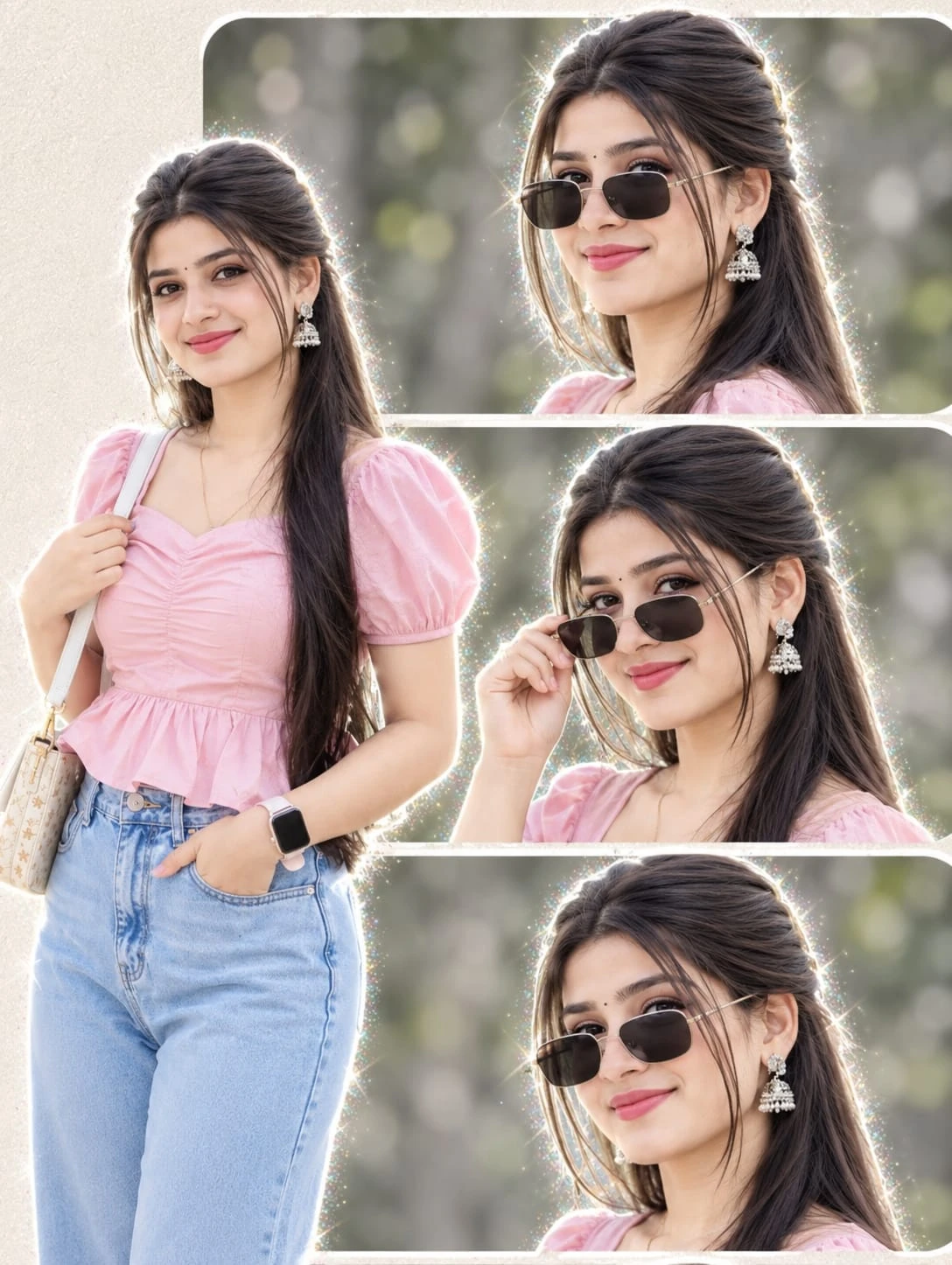
About the Photo Prompt
This collage mixes a full-body fashion shot with three expressive close-ups in one balanced layout. The outfit is simple and feminine: a pink puff-sleeve top with a ruched sweetheart neckline, light blue high-waist jeans, a white patterned handbag and a pastel smartwatch. Silver jhumka earrings and a small bindi add a graceful Indian touch. The background is a soft green bokeh, and the cream textured borders with rounded frames give the whole piece a clean, editorial look.
The three close-ups each have a different mood: a confident smile with sunglasses on, a playful pose with one hand lifting the sunglasses, and a relaxed tilted-head smile.
How to Use (For Image Generation)
- Open an AI image generator that supports reference photo upload.
- Upload a clear, front-facing photo of yourself with good lighting.
- Paste the full prompt from the Prompt Text section below.
- Set the aspect ratio to portrait (3:4 or 4:5) and the quality to the highest available.
- Generate, then compare the faces in all four panels with your original photo.
- If the face drifts, re-run with the line “keep my exact original face” repeated once at the start.
Prompt Information & Details
- Type: Photo collage (reference-image based)
- Layout: 1 full-body portrait (left) + 3 close-up portraits (right, stacked)
- Style: Ultra-realistic, aesthetic, DSLR portrait
- Outfit: Pink puff-sleeve top, blue high-waist jeans
- Accessories: Black sunglasses, jhumka earrings, white handbag, smartwatch
- Background: Soft blurred green nature bokeh
- Borders: Cream textured, rounded frames
- Output quality: 4K HD
About This Prompt
This prompt is built around identity preservation. It repeats the “face unchanged” instruction so the generator treats your uploaded photo as the fixed reference. It then locks the layout, outfit, accessories, background and lighting in plain language, so the output follows the same structure each time. The result is a consistent, social-media-ready collage rather than a random reinterpretation.
Best Results & Customization Tips
- Use a sharp reference photo. A front-facing, well-lit image with no heavy filters gives the best face match.
- Change the outfit colour by replacing “pink puff-sleeve top” with another colour, such as lavender, mint or white.
- Swap the background for a golden-hour park, a café, or a studio backdrop while keeping “soft blurred” in the text.
- Vary the close-up poses: for example, “adjusting hair”, “looking over the shoulder” or “laughing candidly”.
- Change the border style to white, pastel blue or a polaroid look.
- Fix hands and accessories by adding “natural hands, correct finger count” if the generator struggles.
- Generate in portrait ratio so the collage is not cropped or stretched.
Comments (0)
Security Check
Please complete the captcha to verify you are human.