


About the Photo/Prompt
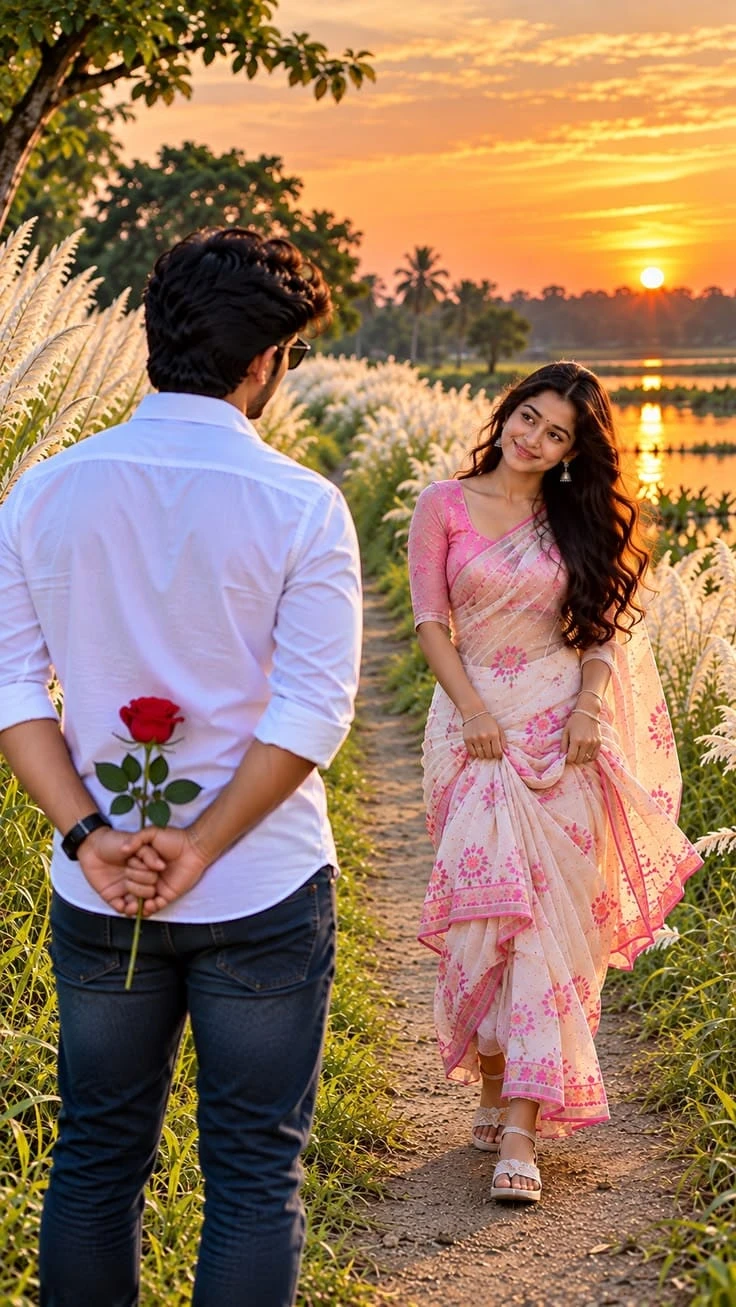
This image trending ai photo AI prompt tells a small love story in a single frame. A young man stands with his back to the camera, hiding a red rose behind him, while a woman in a soft pink floral saree walks toward him with a sweet, shy smile. The surprise element makes the scene feel natural and candid rather than posed.
The setting is just as romantic: a narrow dirt path through tall white kans grass, green trees and palms, and a still lake that reflects the glowing orange sunset. The warm light on the saree fabric, her wavy hair and the white shirt gives the whole image a dreamy, cinematic mood.
How to Use (For Image Generation)
- Open an AI image generator that supports reference photo upload.
- Upload a clear photo of the couple, or one photo of each person, with good lighting and no heavy filters.
- Paste the full prompt from the Prompt Text section below.
- Set the aspect ratio to 9:16 vertical and the quality to the highest option.
- Generate 2 to 4 images and compare the faces with your reference photos.
- If a face drifts, re-run and add “keep both faces exactly the same as the reference” at the start.
Prompt Information & Details
- Type: Romantic couple portrait (reference-image based)
- Subjects: One man (back to camera) and one woman (facing him), identities preserved
- Man’s look: Thick voluminous black hair, white shirt with rolled sleeves, dark blue jeans, black wristwatch, sunglasses
- Woman’s look: Light pink floral saree with matching blouse, delicate earrings, small bindi, long wavy black hair
- Key prop: Single red rose held behind his back
- Setting: Rural pathway, tall white kans grass, green and palm trees, calm lake
- Lighting: Golden-hour sunset, warm orange tones
- Camera look: Full-body, 85mm portrait lens, DSLR, HDR
- Quality: 8K UHD
- Aspect ratio: 9:16 vertical
About This Prompt
This prompt separates the scene into clear blocks (subjects, background, photography style, important rules), so the generator keeps every element in place. The “back toward the camera” and “rose clearly visible” lines lock the main storytelling detail, and the closing rules (no extra people, no extra fingers, no blurry faces) reduce common AI errors. Detailed fabric and lighting words help the saree and the sunset look realistic.
Best Results & Customization Tips
- Use a clear reference photo. Since the man faces away, the woman’s face is the main identity match, so give her photo extra care.
- Change the saree colour to red, yellow, sky blue or pastel green for a different mood.
- Swap the outfit style to a lehenga or a kurta set for a festive version.
- Change the time of day to “blue hour twilight” or “misty sunrise” for a softer look.
- Replace the rose with a bouquet, a gift box or a handwritten letter.
- Fix hands and the rose by adding “natural hands, correct finger count, rose clearly visible”.
- Add “shallow depth of field” if the background looks too sharp or busy.
Generation Parameters
- Aspect ratio: 9:16 (vertical)
- Resolution: Highest available (up to 8K if supported)
- Style: Photorealistic, cinematic golden-hour photography
- Lens look: 85mm portrait, shallow depth of field
- Reference image: 1 clear couple photo, or 2 separate photos
- Variations: 2 to 4 per run, then pick the best face match
Comments (0)
Security Check
Please complete the captcha to verify you are human.