
Prompt copied to clipboard!
  • Login
  • Prompt successfully copied to clipboard!
    Midjourney v6.0 Free Prompt
    Makoto Shinkai Cloudscape Twilight - Gemini AI Photo Prompt Copy Paste | Midjourney v6.0 | QuotesMin 16:9
    HARISH CHANDRA
    HARISH CHANDRA @Harish-chandra

    Makoto Shinkai Cloudscape Twilight

    Master AI Prompt
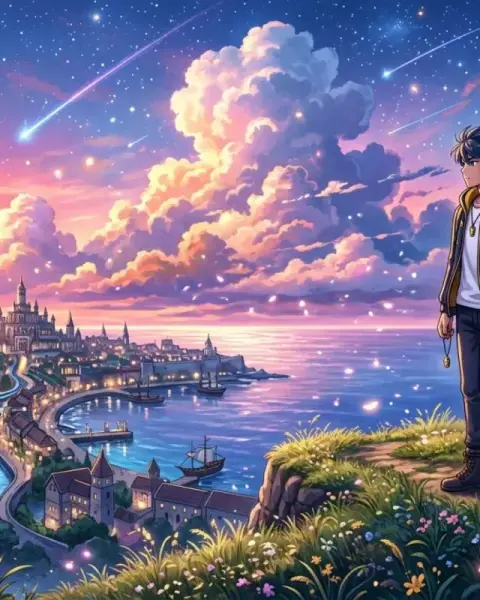
    Breathtaking anime sky filled with towering cumulus sunset clouds glowing pink and gold, shooting stars trailing across twilight, hyper-detailed anime scenery --ar 16:9
    Save Prompt
    Visual Guide & AI Insights • Midjourney v6.0

    Visual Overview & Prompt Guide for Makoto Shinkai Cloudscape Twilight

    Makoto Shinkai Cloudscape Twilight is a curated generative AI masterpiece created under the Cartoon & Anime Prompts collection. Featuring precision aesthetics, intricate lighting, and photo-real textures, this creation showcases the cutting-edge potential of modern diffusion models like Midjourney v6, FLUX.1 [dev], and DALL-E 3.

    Prompt Engineering & Generation Tips:

    • Aspect Ratio: Use aspect ratios tailored for high-impact viewing, such as --ar 16:9 for cinematic landscape shots or --ar 4:5 for portrait feeds.
    • Stylization & Detail: Pair with lighting keywords such as volumetric lighting, ambient studio glow, and 8k octane render for maximum visual fidelity.
    • Model Recommendation: Best executed on FLUX.1 or Midjourney with stylized weights to maintain crisp edges and natural depth of field.

    Prompt Technical Specifications

    Midjourney v6.0
    Engine / Model Midjourney v6.0
    Aspect Ratio --ar 16:9
    Category Cartoon & Anime Prompts
    Recommended Quality 8K UHD / Octane
    Recommended Negative Prompt
    blurry, low quality, bad anatomy, deformed eyes, extra fingers, distorted, watermark, signature, oversaturated, amateur photography
    Ready-to-Run /imagine Command
    /imagine prompt: Breathtaking anime sky filled with towering cumulus sunset clouds glowing pink and gold, shooting stars trailing across twilight, hyper-detailed anime scenery --ar 16:9 --v 6.0

    Frequently Asked Questions

    Click the Copy Prompt button above. Open your AI generation tool (Midjourney Discord, FLUX.1 interface, or ChatGPT) and paste the prompt into the input box. You can keep the default aspect ratio or change --ar 16:9 to fit your desired dimensions.
    Yes! Swap specific descriptors like colors (e.g. replace 'pink neon' with 'cyan sapphire' or 'golden sunset'), change the camera lens, or adjust environment keywords while keeping the overall lighting formula intact.
    Yes, prompts shared on QuotesMin can be freely utilized to create generative artwork for personal, professional, and commercial creative campaigns.

    Related Prompts in Cartoon & Anime Prompts

    Explore more
    Comments (0)
    Please sign in to leave a comment.