How to Use
-
Copy the AI Prompt provided in your workflow.
-
Open your preferred AI image generator (such as Midjourney, Bing Image Creator / DALL-E 3, or ChatGPT Plus).
-
Paste the prompt and tweak the color schemes or outfit styles slightly if you want a custom modification.
-
Hit generate to create and download your high-resolution traditional portrait.
? Prompt Information & Details
-
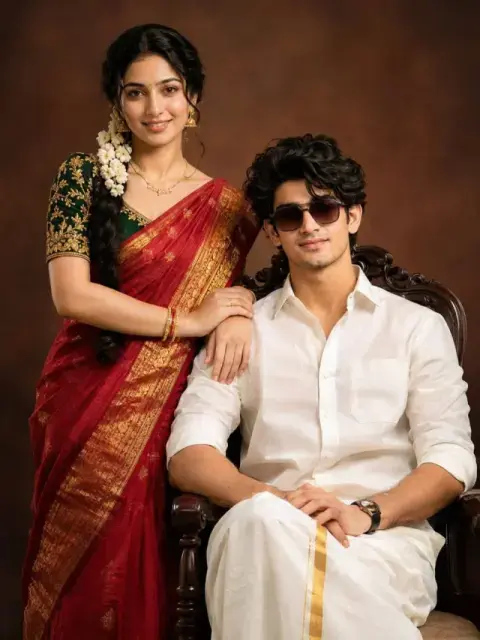
Base Style: Professional studio portrait
-
Subject: South Indian couple (Woman in a silk saree, man in a veshti)
-
Lighting: Cinematic studio lighting, soft and flattering
-
Background: Solid, warm-toned sepia brown with subtle vignetting
-
Aspect Ratio: 3:4
? About This Prompt
This prompt is specially crafted for creators who want to generate authentic and royal South Indian wedding or traditional engagement-style portraits. Special focus is given to fabric textures like silk and zari, along with cultural details like a jasmine-adorned hair braid to give it a genuine studio photoshoot feel.
✨ Best Results & Customization Tips
-
Color Customization: If you prefer a different color palette, replace "deep red silk saree" in the prompt with options like "royal blue silk saree" or "emerald green silk saree".
-
Background Change: Instead of a warm sepia background, you can experiment with a "royal palace interior background" or a "minimalist floral studio backdrop".
-
AI Tool Recommendation: For the finest results on clothing textures and facial features, use Midjourney v6 or Bing Image Creator.
❓ Can I Customize This Prompt?
Yes, absolutely! You can easily modify the outfits, color choices, jewelry, or background elements according to your preferences to get the exact look you desire.